A local service business's Google ranking in 2026 comes down to a short, specific list: a fully completed Google Business Profile, recent and answered customer reviews, a fast and secure mobile-friendly website, real proof of finished work, structured data Google can read, local backlinks, and content built so AI search tools can pull direct answers from it. Nothing about keyword stuffing or paid tricks moves the needle anymore.
Most business websites don't rank because of a handful of fixable problems: an incomplete Google Business Profile, no schema markup, reviews that haven't been touched in months, a site that's slow or hard to use on a phone. The 11 factors below are drawn from Google's own guidelines and confirmed 2026 changes — what each one means, how much it carries, and one thing to do about it this week.
Google Business Profile Completeness
CriticalYour Google Business Profile is the box that shows up on Google Maps and in local search results with your hours, phone number, photos, and reviews. “Completeness” just means how much of that box you've actually filled in. Every job ProjectCheckin publishes can also generate a ready-to-post Google Business update automatically, which is a separate, smaller completeness signal on top of the one-time setup below.
Impact
Google has said directly, for years, that complete profiles perform better in Search and Maps. SEO trackers watching ranking activity in early 2026 found completeness mattering more than ever — incomplete profiles losing ground, not just missing out on extra visibility.
Do This Week
Go to business.google.com and sign into your profile.
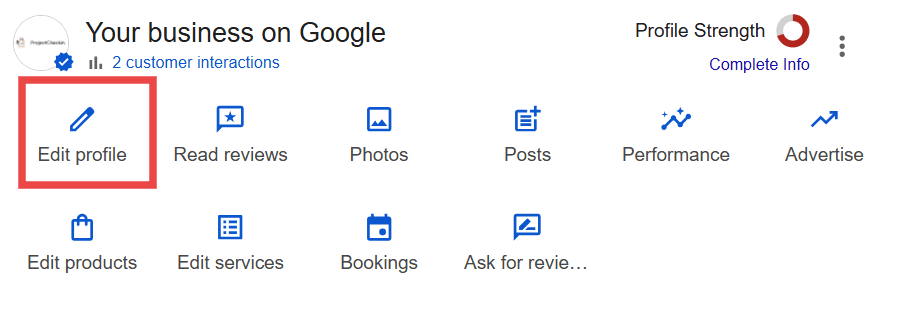
Three things to fill in, in order:
- Click Edit profile, then the About tab. Confirm your primary category is the closest match to what you actually do, then click Add another category to add up to nine more that fit.
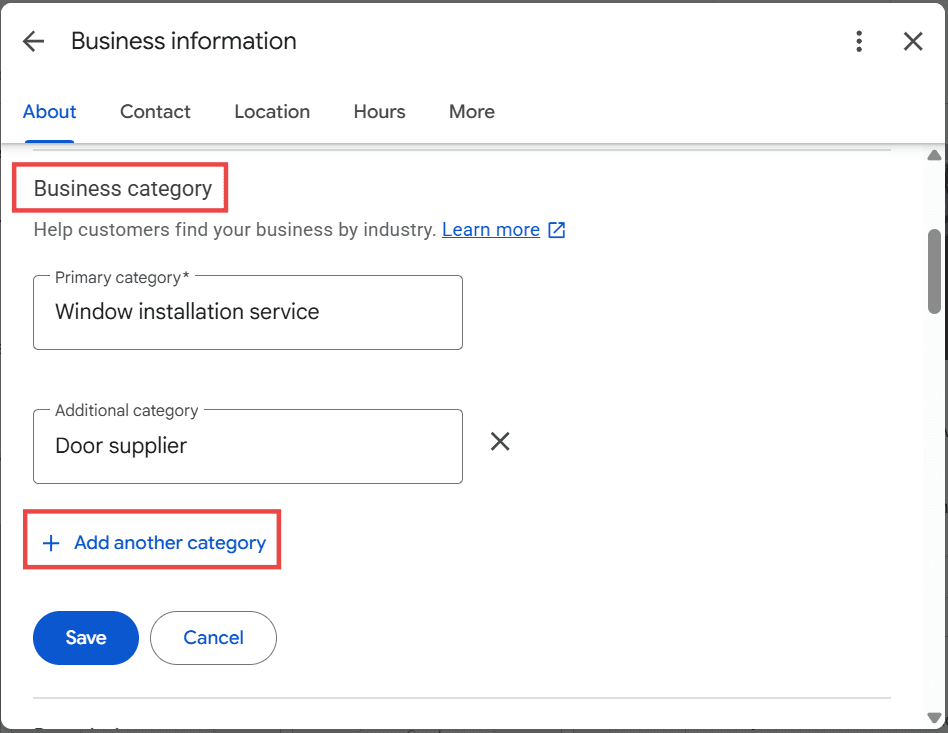
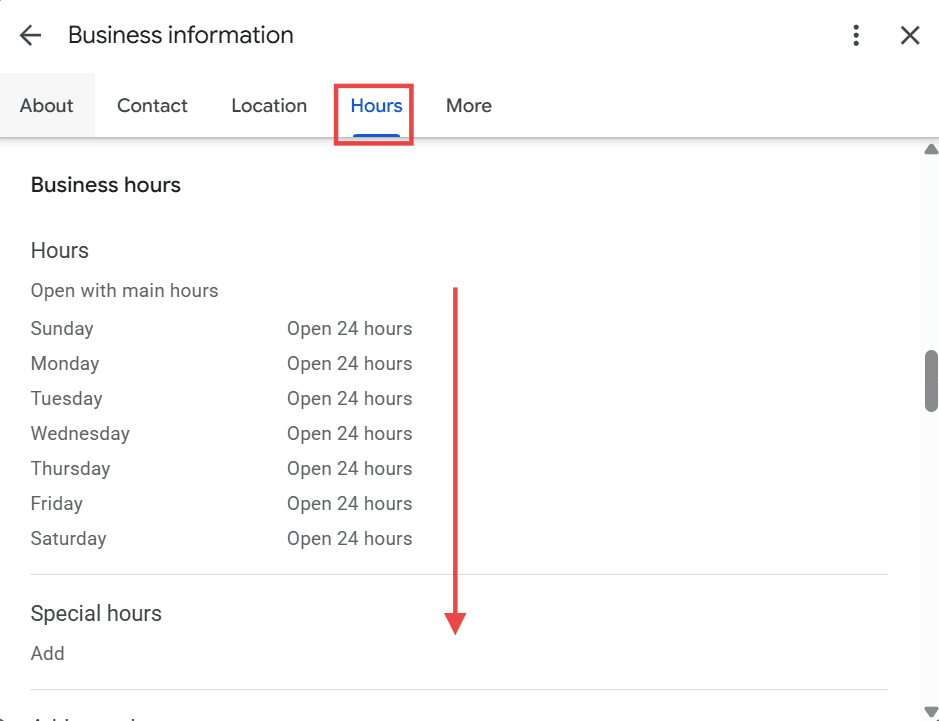
- Click the Hours tab and add your regular hours, then scroll down to Special hours to add anything for holidays.
- Back out to the main dashboard and click Edit services (a separate button, not inside Edit profile) to list every service you offer with a short description for each one.
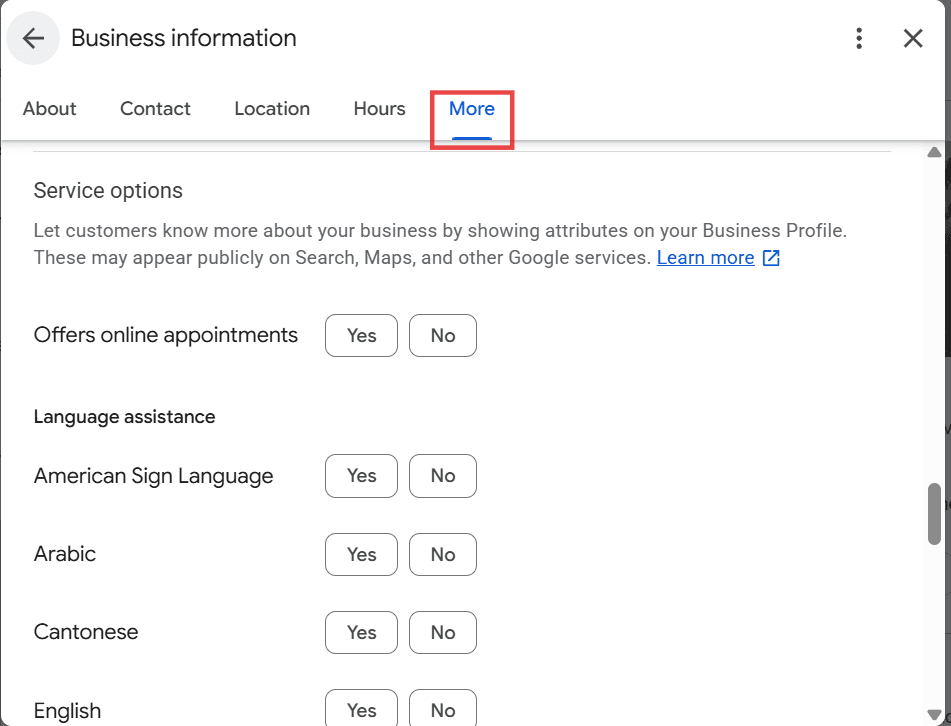
While you're in Edit profile, the More tab also has a Service options section — accessibility, language assistance, appointment booking. It's a smaller completeness signal, but it takes two minutes and most competitors skip it entirely.
Review Recency and Response Rate
CriticalHow recently you've gotten reviews, and how often you actually reply to them, both factor into your ranking now — separate from your total review count. A one-tap review request sent right after a job is the easiest way to keep this signal fresh instead of relying on customers to think of it themselves.
Impact
Review recency and engagement carry more weight than raw count. SEO trackers watching ranking activity in early 2026 found businesses with a steady flow of recent reviews consistently outranking ones sitting on a large but stale review count. Responding within 24-48 hours, to both good and bad reviews, is part of that signal.
Do This Week
Go to business.google.com and click Reviews in the left menu. Start replying to every review that doesn't have a response yet, oldest first. Name the actual service in your reply, and the customer's first name if you can — a real, specific two-sentence reply beats a generic thank you every time.
NAP Consistency (Name, Address, Phone)
HighYour business name, address, and phone number need to match, exactly, everywhere they appear online — Google, your website, Yelp, BBB, Facebook, and any directory you're listed on. “Suite 100” on one site and “#100” on another counts as a mismatch.
Impact
Every mismatch is a small dose of doubt Google can't fully resolve about whether these are really the same business. Enough of them and your profile loses trust.
Do This Week
Open an incognito window and search your business name and city. Open every result on the first page — your website, Yelp, Facebook, BBB, any directory that comes up — and write down the address and phone number listed on each one. Anywhere that doesn't match your Google Business Profile exactly, whether it's an old phone number, an abbreviation, or a suite number formatted differently, go fix it.
Proximity, Relevance, and Prominence
CriticalThese are the factors Google has stated, directly, decide who shows up in the local map pack. Proximity is how close you are to the person searching. Relevance is how well your profile matches what they typed in. Prominence — what Google's own Business Profile help center currently calls “popularity” — is how well-known and trusted your business is online.
Impact
You can't do much about proximity — that's just geography. But relevance and prominence are both things you control, through your category choice, your service list, and the reviews and mentions you build over time.
Do This Week
In Google Business Profile Manager, go to Edit profile, Business information, Category, and check that your primary category is as specific as it can be — “Garage Door Supplier” beats “Contractor” every time. Then go to your Services section and rewrite anything vague using the words a customer would actually search, like “garage door spring repair” instead of “repair services.”
Mobile-Friendliness
CriticalGoogle looks at how your website works on a phone before it looks at how it works on a desktop computer, when deciding where to rank you. A lot of business sites were built years ago for desktop and never checked on mobile since.
Impact
Critical — confirmed Google policy since mobile-first indexing was enforced.
Do This Week
Pull up your website on your phone, in Safari or Chrome, and go through every page a customer would actually look at: home, services, contact. Write down anything that's cut off, too small to read, too small to tap, or slow to load. Send that list to whoever manages your site and get it fixed.
Core Web Vitals (Page Speed and Stability)
CriticalThis measures two things — how fast your page loads, and whether the page jumps around while it's loading (like a button moving right as you're about to tap it). Google has confirmed directly, since 2021, that both affect ranking.
Impact
Critical — a documented part of Google's Core Web Vitals ranking signal.
Do This Week
Go to pagespeed.web.dev, paste in your homepage, and hit Analyze. Check the Mobile tab first, since that's what Google actually uses to rank you. Anything scored red or orange is a real problem — send the report to your developer or hosting provider and have them fix the red ones first.
HTTPS (Secure Connection)
CriticalThat's the little padlock icon next to your web address. It means the connection to your site is encrypted. Sites without it get labeled “Not Secure” in the browser and Google ranks them lower for it.
Impact
Critical, and table stakes since Google confirmed HTTPS as a ranking signal in 2014 — this isn't new, but plenty of older business sites still don't have it.
Do This Week
Look at your website address in the browser bar. If it says http:// without the “s,” or your browser shows “Not Secure,” call your hosting company and ask them to install a free SSL certificate. Most hosts — GoDaddy, Bluehost, Squarespace, Wix — can turn it on in one click from your account dashboard.
Structured Data (Schema Markup)
HighThis is invisible code added to your website that tells Google exactly what your page is about — your business type, your service area, your reviews — instead of making Google guess by reading through your text. Most small business sites have none of it.
Impact
High — documented directly in Google's structured data guidance as enabling rich results and clearer entity understanding. ProjectCheckin's own job pages already carry LocalBusiness and Service schema (see our Local Job Pages feature) — most independent business websites don't.
Do This Week
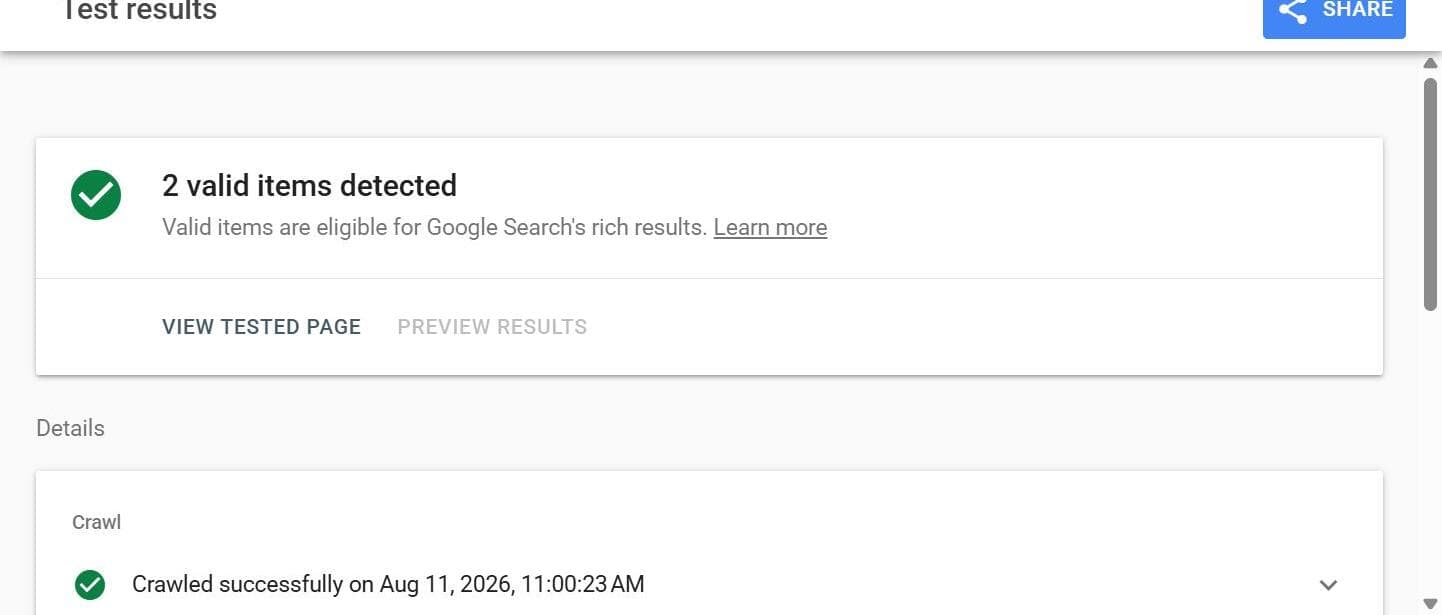
Go to search.google.com/test/rich-results, paste in your homepage, and click Test URL. If it comes back saying no structured data was found, or “LocalBusiness” doesn't show up anywhere in the results, send that to your developer and ask them to add LocalBusiness schema to your site.
Content Quality (E-E-A-T)
HighGoogle calls this E-E-A-T, and it's laid out in their own public Quality Rater Guidelines. In plain terms, Google wants proof that your business actually does the work it claims to do. Real photos of real jobs carry that proof; a vague claim about being “the best in the area” does not — a real before-and-after comparison makes that proof even harder to dismiss.
Impact
High — part of Google's published Quality Rater Guidelines since the 2022 update that added “Experience” to the framework.
Do This Week
Pick your three most recent finished jobs. Upload the photos to your Google Business Profile under Photos, and to your website's project or gallery page if you have one. Write a couple of real sentences under each one: what the job was, where it was, what you did. Skip the stock photos.
Local Backlinks and Citations
Critical / HighA backlink is another website linking to yours — Google reads that as a vote of confidence, and links from local sites (your chamber of commerce, local news, local directories) count for more than generic ones from nowhere in particular. A citation is simpler — it's just your business info listed correctly on a directory site.
Impact
Critical for backlinks, High for citations — Google's founding algorithm has always weighted links heavily, and a Google Search Quality strategist confirmed “links and content” as the top two ranking factors in a 2016 public Q&A.
Do This Week
Three directories to get listed on this week:
- Search your city plus “chamber of commerce business directory” and get listed if you're a member.
- Search your city plus “business directory” for a local news or community site and submit there too.
- Find at least one directory specific to your trade and get on it.
Keep your name, address, and phone number identical to your Google profile on every single one.
Showing Up in AI Search (FAQ Content)
High & GrowingMore people are asking ChatGPT, Perplexity, and Google's AI Overviews questions instead of typing search terms into a search bar. These AI tools pull their answers from pages that state a question and answer it directly, in plain sentences, right up front.
Impact
High and growing through 2026 — FAQ schema is directly confirmed by Google's rich-results documentation, and AI systems consistently favor pages with a clear, extractable answer.
Do This Week
Think about the three to five questions people actually ask before they hire you — price, timeline, warranty, service area. Add an FAQ section to your homepage, or its own page, with each question as a heading and a direct one-to-three sentence answer underneath. If your website platform has a built-in FAQ block — WordPress, Squarespace, and Wix all do — use it.
Where This Leaves You
None of these eleven factors move your ranking by themselves overnight, and anyone who tells you otherwise is selling something. They build on each other over weeks and months of consistent effort — a complete profile, real reviews answered promptly, a site that loads fast and works on a phone, and real proof of work published consistently.
That last part is where ProjectCheckin fits in. Every time your crew checks in on a job, it automatically applies schema markup, publishes to a fast mobile-first page, serves over HTTPS, and adds fresh, location-specific content with structured FAQ formatting AI search tools can read — all as a byproduct of documenting the job the way you'd want it documented anyway. It doesn't touch your review responses, your backlinks, or your NAP consistency across directories — those still take your own hands. But four of the eleven factors above happen automatically, every time a job gets checked in.
Frequently Asked Questions
How long does it take to see ranking improvements after fixing these factors?
Local ranking signals move fastest — profile completeness and review activity can show up in Google’s own reporting within weeks. Broader organic ranking, the kind tied to your actual website, moves on a longer timeline, and Google doesn’t publish a fixed number for that. Local moves first, organic follows.
Do I need to hire an SEO agency to do this myself?
No. Every fix in this article is something you can do yourself inside free Google tools like Google Business Profile and Search Console. None of the 11 factors require a developer or an agency retainer — you need time and a checklist, not a vendor contract.
Which of these 11 factors matters most if I can only do one thing this week?
Google Business Profile completeness and review responsiveness are the two highest-leverage moves you can make. Both are Critical-tier factors, and neither requires touching your website code. Fill out your profile completely and respond to every review within a day or two, and you’ve covered both in one sitting.
Does posting more often on my website help my Google ranking?
Not by itself — how often you publish isn’t a confirmed Google ranking factor. What matters is freshness and substance: real, useful content beats a higher volume of thin posts. The actual leverage for a business owner is in the 11 factors covered above, not in publishing cadence.
Turn Finished Jobs Into New Business
ProjectCheckin turns every completed job into a page that helps the next customer find you, built the way search engines and AI tools actually read pages. See it in action, or check where your own site stands right now.